

Propfirm Account Hedger for NinjaTrader 8
 Created 10 Feb 2026
·
Updated 10 Feb 2026
Created 10 Feb 2026
·
Updated 10 Feb 2026
The Propfirm Account Hedger is a Premium tool for the NinjaTrader 8 platform.
This hedger tool allows you to hedge all trades from a source account into another target account. Hedging is generally used to manage risk by trading in the opposite direction of the active trade — it can be on the same instrument or a different one, on the same account or another account. In our context, hedging is executed across propfirm accounts to completely remove the risk of blown accounts and to always withdraw profits no matter the result of your trading on those accounts. This form of hedging is only possible on propfirm accounts — it can't be used on real trading accounts, since that would result in real capital loss, whereas applied to propfirm accounts it only incurs the propfirm account's fee.
Prerequisites
To properly use this tool you should have the following prerequisites available.
- NinjaTrader 8, with any license type. Click here to download
- An automated-trading.ch account with an active Premium Subscription
- Two equivalent instant-funding propfirm accounts
Features
The Account Hedger tool has a set of unique features:
- No pending orders are placed — only market orders
- Full-auto strategy that can be scaled into multiple instances
- Very lightweight, with very fast execution
The strategy watches for any position opened on the source account and opens an opposite trade on the target account. For example, if a buy trade is opened on the source account, the strategy opens a sell trade on the target account; when the buy trade is closed, the strategy closes the sell trade on the hedge account.
Spread Considerations
The spread on futures is very tight and is generally one tick wide, and one tick has the following values:
- MES: $1.25
- MNQ: $0.50
- MYM: $0.50
- MGC: $1.00
- MCL: $1.00
- ...
These values are for one contract. Let's go through a scenario that explains the impact of spread on hedging. Suppose we're on MES: when a long trade is opened, it's opened on the Ask price, while on the other side the hedging short position is opened on the Bid price. Suppose the trade is 5 micro contracts — this creates a difference of 5 × $1.25 = $6.25 on the open. Then, when the trades are closed, the same spread applies again, for another $6.25 on the close — a total of $12.5 from the spread alone. Add commissions, around $0.65 for MES, so commissions come to $0.65 × 2 × 5 = $6.5. That leaves a total of $6.5 + $12.5 = $19 as a minimum difference in profit/loss for 5 contracts on MES.
So what should you do about that? Nothing — this difference in profit and loss between the blown account and the hedged profitable account isn't big enough to sabotage the hedging value. If you can withdraw $1500 from the hedged account, it covers all expenses including this spread difference.
Account Types Consideration
The idea behind hedging propfirm accounts is to be able to withdraw money at all times, whether your trading is profitable or not during that period. To be able to withdraw money, you should only use instant-funding propfirm accounts — this requirement comes from the fact that you need to be able to withdraw money as soon as one of the accounts is blown, which is only possible if you're running an instant-funding account.
Which Propfirms Are Best For This?
At the time of writing, the two best propfirms to set this up with are:
- Lucid Trading instant funding 50k
- Tradeify instant funding 50k
Parameters
We try to keep the parameters to a minimum — only the most important are exposed.
| License | |
| License | This is the license key you get when you create an account on automated-trading.ch. After creating an account, copy your license key from the billing page. You need to set this parameter only once per month — once the license key is validated it will be remembered for the rest of the month. |
| General | |
| Source Account | Shows a list of all accounts available from all connections currently active. The selected account is the source account to be hedged. |
| Target Account | Shows a list of all accounts available from all connections currently active. The selected account is the target account on which trades will be opened. |
Download & Installation Instructions
License Requirements
At automated-trading.ch you can choose to either purchase a monthly subscription to use our premium products, or use our free products without subscribing.
In both cases, you need to create an account so you can get a License you can use for both premium and free products.
To obtain your license, simply sign up and then get your license on the billing page.
Download
You can also download this strategy — and every other automated-trading.ch strategy or indicator — anytime from your centralized Downloads page.
Installation Steps
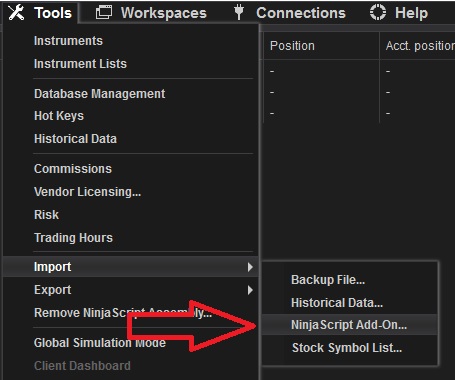
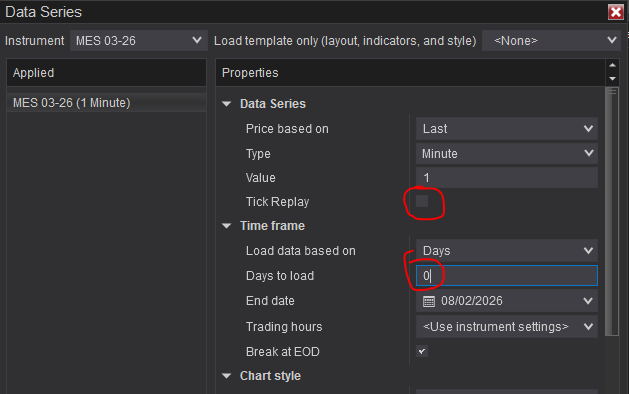
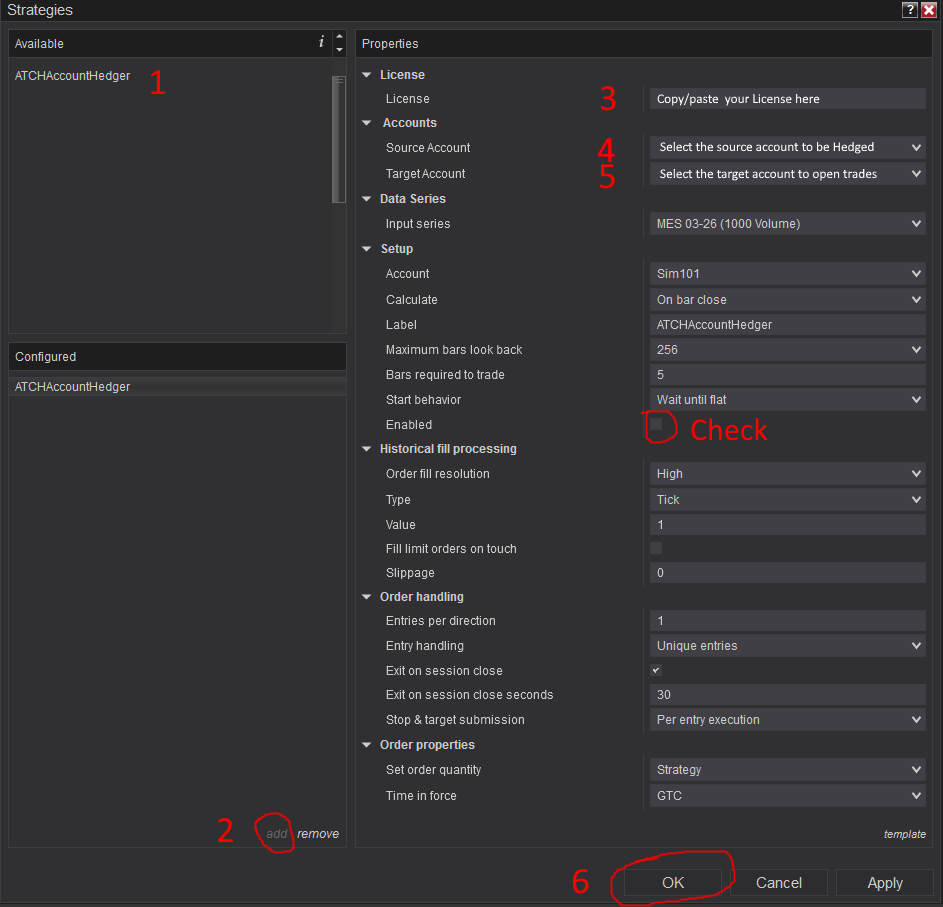
Frequently Asked Questions
General
Billing
Release Notes
- First Release of the strategy