

Ninjatrader 8 Account Copier
 Created 10 Oct 2026
·
Updated 21 Oct 2026
Created 10 Oct 2026
·
Updated 21 Oct 2026
The Account Copier is a Free tool for the NinjaTrader 8 platform.
This copier tool allows you to copy all trades from a source account into up to 20 target accounts — NinjaTrader accounts, or accounts of a Rithmic login even when they are not connected in NinjaTrader. Every trade opened or closed on the source account is mirrored, in the same direction and with the same quantity (or capped at a maximum you set per account), on every target account — so you trade once and your whole fleet of accounts follows. This is particularly useful with propfirm accounts, where you often run several evaluation or funded accounts at the same time and want them all to take the same trades as your main account, without placing every order by hand on each of them.
Prerequisites
To properly use this tool you should have the following prerequisites available.
- NinjaTrader 8, with any license type. Click here to download
- An automated-trading.ch account with an active Free account (no paid subscription required)
- Source and target propfirm accounts — check out the propfirms guide page to choose which propfirm is best
- A NinjaTrader strategy to copy trades from — check out our Opening Range Breakout strategy or our Machine Learning strategy
Features
The Account Copier tool has a set of unique features:
- Copies one source account into up to 20 target accounts
- Targets can be NinjaTrader accounts (Tradovate) or Rithmic accounts, mixed freely
- Can copy every instrument traded on the source account with a single copier
- Optional maximum order quantity per target account
- No pending orders are placed — only market orders
- Very lightweight, with very fast execution — each target account is sent in parallel, so a slow account never delays the others
The strategy watches for any order filled on the source account and sends the same order to every target account. For example, if a buy trade is opened on the source account, the strategy opens a buy trade on each target account; when the source account's trade is closed, the strategy closes the trade on each target account.
Entries and Exits Are Both Copied
The strategy doesn't care how a trade got on the source account — you can place it manually, with an ATM strategy, or let another automated strategy trade it. Both the entries and the exits are copied the moment the source account's order is filled, and that includes exits triggered by a stop loss or a take profit sitting on the source account. Partial fills are copied as they come, with the quantity that was actually filled.
Copy All Instruments
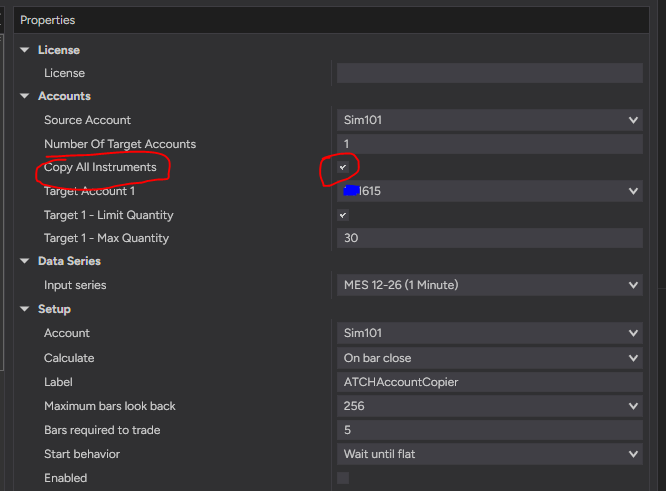
By default the copier copies the trades of the instrument of the chart it is running on. Turn on Copy All Instruments and every fill of the source account is copied, whatever the instrument — so one copier is enough, whatever you trade on the source account. In this mode, do not run two copiers on the same source account: every trade would be copied twice.
Rithmic Accounts as Targets
Since NinjaTrader bought Tradovate, NinjaTrader has stopped integrating further Rithmic accounts into its platform — which is why, when you purchase a new propfirm account, you now need to choose between a Tradovate or a Rithmic account. There are exceptions, like the Apex Funded Trader propfirm, which still allows connecting its Rithmic accounts into NinjaTrader, but generally speaking Rithmic accounts can no longer be connected from NinjaTrader. This copier can act as a bridge: it copies your trades to an externally connected Rithmic account. Choose the Rithmic Account entry in a Target Account list and enter the Rithmic system and gateway, the user, the password and the id of the account — the copier then logs in to Rithmic by itself and sends the copied orders straight to that account. This is how you copy into propfirm accounts that can't all be connected at the same time in one NinjaTrader instance, for example accounts of two different Rithmic propfirms. Targets that use the same Rithmic login share a single connection.
- Rithmic targets receive futures trades only, on the CME, CBOT, NYMEX and COMEX exchanges. An instrument the copier can't map to one of them is skipped, and the status card shows which one and why.
- The copier only uses Rithmic's order connection: it subscribes to no market data and sends market orders only. The position it expects on the Rithmic account is read back from Rithmic, so exits never exceed what the account really holds.
Maximum Quantity per Target Account
Propfirm accounts often have different contract limits. Tick Limit Quantity on a target account and set its Max Quantity: an entry bigger than that number is clipped to it, a smaller one is copied unchanged. Exits are never clipped — they close at most what the account holds. The status card shows the limit next to the account, for example "| max 5".
Fast and Independent Target Accounts
Every target account has its own queue: the orders of one target are always sent in order, while the targets themselves are sent in parallel and never block each other, nor the source account. A slow or disconnected target account never delays the copy to the others.
Safe by Design
- A copied exit can never be bigger than what the target account actually holds, so an exit never flips a target account into the opposite position.
- Only new fills are copied. Trades that already exist on the source account when the strategy starts, or that NinjaTrader re-sends after a reconnection, are history and are never copied.
- A target account that is not selected, can't be found, is the same account as the source, or is already used by another slot is left out and reported on the status card.
Good to Know
- Needs a chart: the copier needs to be added to a chart to run — it copies the trades of that chart's instrument and shows its status card there.
- One instrument per instance, unless you copy all: by default the strategy copies the trades of the instrument of the chart it is running on. To copy another instrument, add another instance of the strategy on that instrument's chart — or turn on Copy All Instruments and let a single instance copy them all.
- Rithmic passwords are stored in the parameters: a Rithmic password is saved in clear text in the strategy parameters, and so in parameter templates and workspaces. Don't share a template or a workspace that contains one.
- Rithmic sessions are limited: Rithmic limits the concurrent sessions of a user. The copier opens only one connection per login, however many accounts or copier instances use it — but a login that is also open elsewhere may be disconnected by Rithmic.
- Start while the source account is flat: a position that is already open on the source account when the strategy starts is not copied, and neither is its exit — the target accounts hold nothing to close.
- Market orders, separate fills: every target account fills at its own price and can be rejected on its own (for example by a propfirm's rules or a lost connection). A copy that can't be sent is written to the NinjaScript Output window and is not retried, so keep an eye on the status card.
- No protective orders on the targets: the strategy does not place stop loss or take profit orders on the target accounts. It copies the exit when it happens on the source account.
Examples
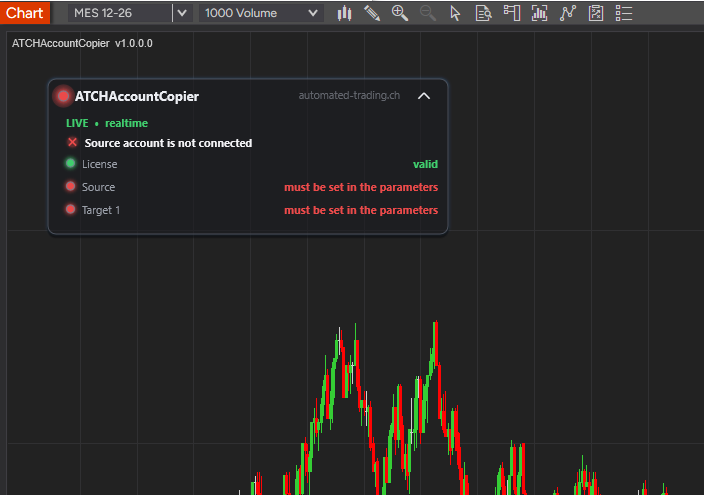
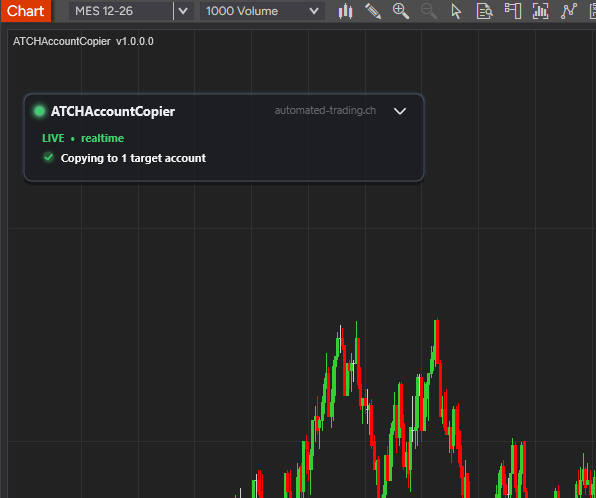
The strategy shows a status card on the chart. It lists the license, the source account, and one row per target account, each with a colored indicator and a short message, and a summary line in its header. The card can be moved anywhere on the chart with a simple mouse drag and drop. Let's look at two examples of it.
Example #1: Source and Target Accounts Not Set
Right after adding the strategy to a chart, before the accounts are selected in the parameters, the status card tells you exactly what is missing. The Source row and the Target 1 row turn red and read "must be set in the parameters", and the header summary reports what is preventing the copy from starting. Nothing is copied until the source account and at least one target account are selected.
Example #2: Valid State, Good to Go
When everything is set up correctly — a valid license, and the source account and the target accounts selected and connected — the strategy is ready to copy. The License row turns green and reads "valid", the Source row and every Target row turn green and show the account name followed by its connection status, and the header summary confirms that copying is active, for example "Copying to 3 target accounts". From this point on, every trade filled on the source account is copied to the target accounts. If only some of the target accounts are connected, the header tells you how many are, so you notice right away that an account is missing. A Rithmic target shows its account id and "connected" once the login is up, and if the id isn't found it lists the ids the login really has. A target with a maximum quantity also shows it, for example "| max 5".
Parameters
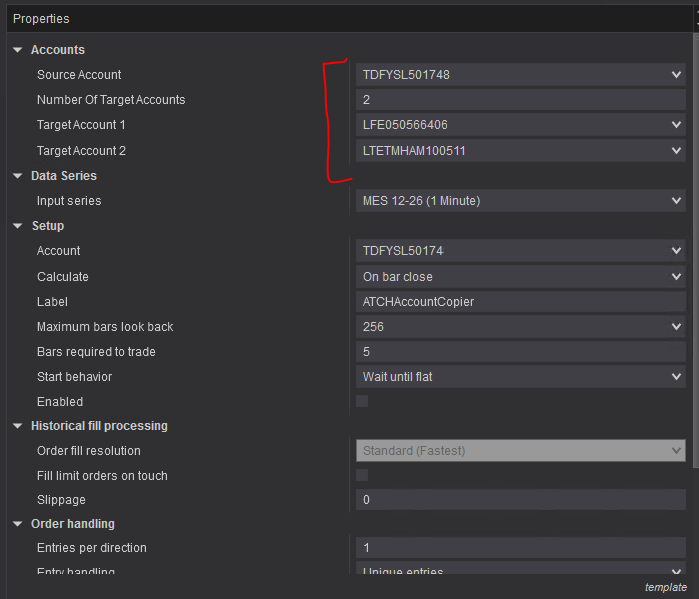
We try to keep the parameters to a minimum — only the most important are exposed.
| License | |
| License | This is the license key you get when you create an account on automated-trading.ch. After creating an account, copy your license key from the billing page to the license parameter. The license will be active for one month, then you need to reverify the license to confirm you are still using the product. |
| Accounts | |
| Source Account | Shows a list of all accounts available from all connections currently active. The selected account is the source account: every fill on it, entries and exits alike, is copied unchanged to the target accounts. |
| Number Of Target Accounts | How many accounts to copy into, from 1 to 20. Only that many Target Account parameters are shown below it — change the number and the list adjusts. |
| Copy All Instruments | Off (default): only the fills of the instrument of this chart are copied. On: every fill of the source account is copied, whatever the instrument, so one copier is enough. Don't run two copiers on the same source account in that mode, every trade would be copied twice. Rithmic targets need futures contracts whose exchange the copier knows; any other instrument is skipped and shown on the status card. |
| Target Account 1 … Target Account N | Each one shows a list of all accounts available from all connections currently active, plus a Rithmic Account entry. Each selected account is a target account on which the source account's trades are copied; choosing Rithmic Account copies into an account of a Rithmic login instead, and its connection settings appear right below. A target account must differ from the source account and from the other target accounts, otherwise it is left out and the status card tells you why. |
| Target N - Rithmic Endpoint | The Rithmic system and gateway this account's login connects to, as in Rithmic Trader Pro's login screen (for example Rithmic Paper Trading - Chicago Area). Pick the one your propfirm gave you. |
| Target N - Rithmic User | The Rithmic user id of the login that owns the account. |
| Target N - Rithmic Password | The Rithmic password of that login. It is stored in clear text in the strategy parameters, and so in parameter templates and workspaces. |
| Target N - Rithmic Account Id | The id of the Rithmic account the trades are copied into, as shown in R | Trader. If it isn't found, the status card shows the ids the login really has. Targets with the same endpoint and user share one Rithmic connection. |
| Target N - Limit Quantity | Tick it to give this account its own maximum order quantity (propfirm accounts often have different limits). Off: the quantity of the source account is copied as is. |
| Target N - Max Quantity | Shown when Limit Quantity is ticked. The largest quantity copied to this account in one order, from 1 up: a source trade up to this value is copied unchanged, a bigger one is clipped to this value. Only entries are clipped — an exit closes at most what the account holds. |
Download & Installation Instructions
License Requirements
At automated-trading.ch you can choose to either purchase a monthly subscription to use our premium products, or use our free products without subscribing.
In both cases, you need to create an account so you can get a License you can use for both premium and free products.
To obtain your license, simply sign up and then get your license on the billing page.
Download
You can also download this strategy — and every other automated-trading.ch strategy or indicator — anytime from your centralized Downloads page.
Installation Steps
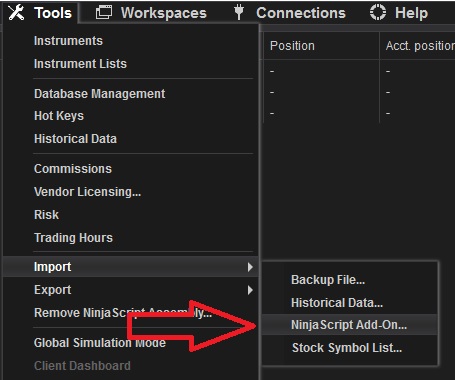
Frequently Asked Questions
General
Release Notes
- Added External Rithmic account capabilities
- Added copy all instruments Flag
- First Release